
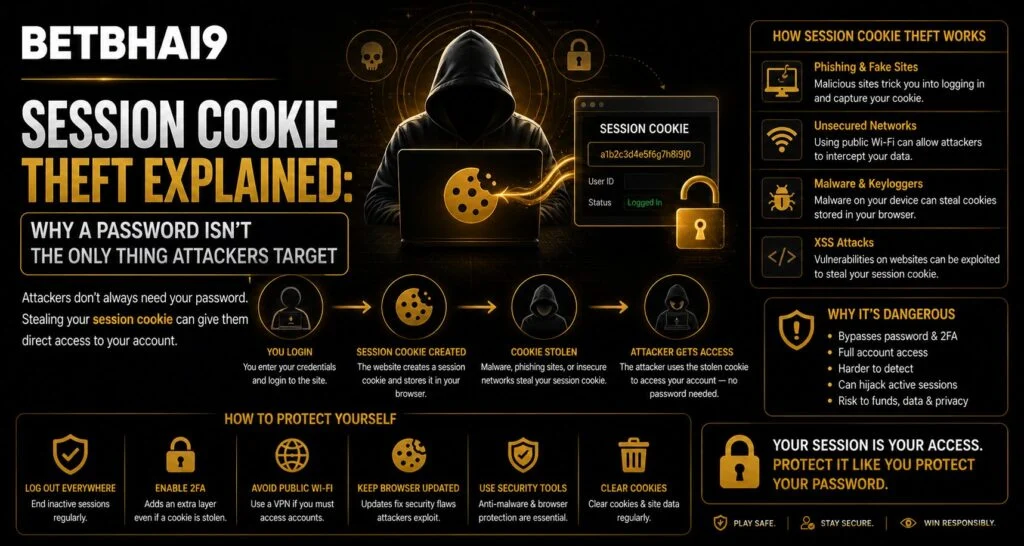
Most users think account security begins and ends with choosing a strong password. In reality, attackers may also target the temporary data that keeps a user signed in after successful authentication. For Betbhai9 users, understanding session cookies is useful because an account can sometimes be exposed even when the password itself has never been revealed. Knowing how sessions work makes it easier to recognise suspicious activity and protect active logins.
What Is a Session Cookie?
A session cookie is a small piece of data stored by a browser after a user successfully signs in. It helps a website recognise that the person has already completed authentication, preventing them from entering their username and password on every page.
After completing a Betbhai9 Login, for example, the browser may receive a temporary session identifier. That identifier acts like proof that authentication has already taken place.
Session cookies normally have limited validity and may expire when:
- The user signs out
- The browser session ends
- The platform expires the session
- Security settings invalidate old sessions
- A password or account change triggers session termination
Why Would Attackers Target Session Cookies?
Passwords can be protected with strong encryption, password managers and multi-factor authentication. Session information can therefore become another target because it represents an already authenticated connection.
If an attacker somehow obtains valid session data, they may attempt to impersonate an existing session rather than trying to guess the password itself.
This is why protecting a Betbhai9 ID involves more than creating a complicated password. Users also need to consider browser security, device access and active sessions.
How Can Session Information Become Exposed?
Session data may be put at risk through several common security problems. Users do not need to understand the technical mechanics to reduce their exposure.
Potential risks include:
- Malware installed on a computer or phone
- Malicious browser extensions
- Fake login or phishing pages
- Shared or compromised devices
- Unsafe browser profiles
- Outdated operating systems
- Stolen devices that are already logged in
For users accessing the Betbhai9 App, device security is especially important because an unlocked phone may provide direct access to accounts that are already authenticated.
A Strong Password Is Still Important
Session security does not make passwords less important. A strong, unique password remains one of the most important protections against unauthorized access.
Users should avoid:
- Reusing passwords across websites
- Sharing passwords through chat messages
- Saving credentials on public devices
- Using names, birthdays or simple number sequences
- Keeping passwords in unprotected notes
A secure Betbhai9 Login password should be different from passwords used for email, banking, social media or other online services.
Log Out When Using Shared Devices
Closing a browser tab is not always the same as signing out. If the browser still holds an active session, another person using the device may be able to reopen the account.
Betbhai9 Club users who access their accounts from a shared computer should always use the platform’s logout option before leaving.
Additional precautions include:
- Avoid enabling “remember me” on shared devices.
- Remove saved credentials after use.
- Clear session data when appropriate.
- Never leave a device unattended while logged in.
- Avoid saving passwords in another person’s browser profile.
Review Active Sessions Regularly
Some platforms provide information about active devices or login sessions. When available, this feature can help users identify unfamiliar access.
A Betbhai9 ID holder should review active sessions whenever unusual behaviour appears, such as unexpected account activity or a device appearing that they do not recognise.
If an unfamiliar session is visible, users should:
- End the suspicious session.
- Change the account password.
- Review the connected email or phone account.
- Remove unknown browser extensions.
- Scan the device for malware.
Be Careful With Browser Extensions
Extensions can access significant amounts of browser information depending on the permissions they receive.
Before installing an extension, check:
- Who created it
- What permissions it requests
- Whether those permissions match its purpose
- Whether it still receives security updates
- Whether you actually need it
Betbhai9 App users should apply the same principle when installing unrelated apps that request excessive device permissions.
Keep Devices and Browsers Updated
Security updates frequently fix vulnerabilities that could otherwise expose browser or account data. Ignoring updates for long periods can leave unnecessary weaknesses.
Users accessing Betbhai9 Club services should keep their operating system, browser and security software current.
Avoid downloading unknown software simply because it claims to improve performance, unlock features or provide account-related tools.
What Should You Do After Suspicious Activity?
If you suspect that an active session has been compromised, changing only the password may not be enough unless existing sessions are also terminated.
A safer response is to:
- Sign out of all active sessions if the option exists.
- Change the password from a trusted device.
- Remove suspicious applications or extensions.
- Secure the associated email account.
- Contact official support if activity continues.
Users visiting Betbhai9 Com should use verified support channels rather than links received from unknown messages.
Conclusion
Session cookie theft demonstrates why modern account security extends beyond passwords. A secure password protects the authentication process, while device security, browser safety and session management protect what happens after login.
Betbhai9 users can reduce risk by signing out on shared devices, reviewing active sessions, avoiding suspicious extensions and maintaining updated software. If unusual account activity appears, acting quickly and ending existing sessions can be just as important as changing the password.
FAQs
What is a session cookie?
A session cookie is temporary browser data that helps a website recognise a user who has already authenticated successfully.
Can someone access an account without knowing the password?
In certain security incidents, an attacker may try to misuse an already authenticated session instead of obtaining the password directly.
Does changing a password automatically end every session?
Not necessarily. It depends on the platform’s security settings, so users should also look for an option to sign out of all devices.
Are browser extensions a security risk?
They can be if they request unnecessary permissions, come from untrusted sources or contain malicious code.
What should I do if I notice an unfamiliar login?
End unknown sessions, change your password from a trusted device and review your browser, email and device security.
Where should users seek account assistance?
Users should rely on official Betbhai9 Com support channels rather than unknown third-party links or messages.


